mirror of
https://github.com/jlengrand/worldclock.git
synced 2026-03-10 08:41:17 +00:00

81 lines
2.7 KiB
Markdown
81 lines
2.7 KiB
Markdown
# World Clock - A JavaFX World Clock
|
|
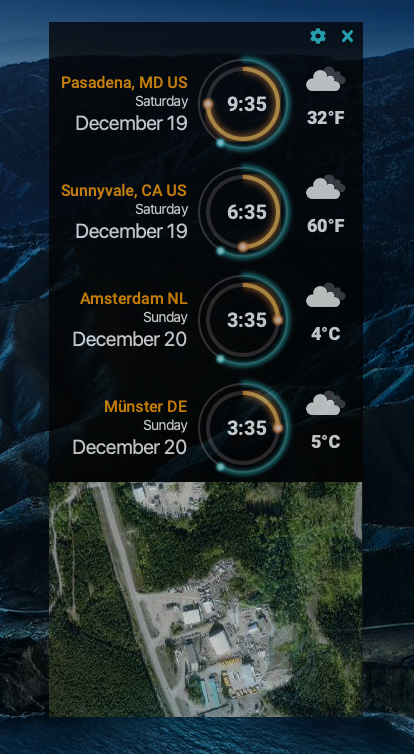
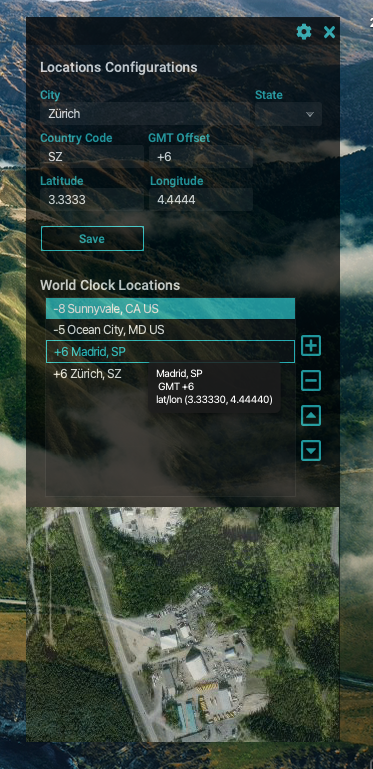
Welcome to the World Clock application! This project is for a series of blog entries at https://foojay.io
|
|
|
|
- https://foojay.io/today/creating-a-javafx-world-clock-from-scratch-part-1
|
|
- https://foojay.io/today/creating-a-javafx-world-clock-from-scratch-part-2
|
|
- https://foojay.io/today/creating-a-javafx-world-clock-from-scratch-part-3
|
|
- https://foojay.io/today/creating-a-javafx-world-clock-from-scratch-part-4
|
|
|
|
|
|
|
|
|
|
This is a standard Maven JavaFX modular (JPMS) application.
|
|
|
|
## Requirements:
|
|
- Maven 3.6.3 or greater
|
|
- Java 16+
|
|
- Bach (https://github.com/sormuras/bach) (Optional)
|
|
|
|
It's recommended if you use a JDK distro that already contains the OpenJFX libraries such as Azul's Zulu builds with JavaFX.
|
|
If not, then you must uncomment the dependencies needed in the pom.xml file.
|
|
|
|
## Build project using Bach
|
|
|
|
`$ .bach/bin/bach build`
|
|
|
|
To simplify add to your .bashrc or .bash_profile as the following:
|
|
|
|
`export PATH=$PATH:.bach/bin`
|
|
|
|
Open a new terminal session to be able to run Bach build tool.
|
|
|
|
On Windows you'll add to your environment variables as the following:
|
|
|
|
`set PATH=%PATH%;.bach\bin`
|
|
|
|
### Run World Clock as a module
|
|
|
|
`$ java --add-modules worldclock --module-path .bach/workspace/modules/:.bach/external-modules/ com.carlfx.worldclock.Launcher`
|
|
|
|
### Run World Clock using a custom image
|
|
|
|
```bash
|
|
# Linux/MacOS
|
|
$ .bach/workspace/image/bin/worldclock
|
|
```
|
|
|
|
```bash
|
|
# Windows
|
|
$ .bach\workspace\image\bin\worldclock
|
|
```
|
|
|
|
## Clean project using Maven
|
|
|
|
`$ mvn clean`
|
|
|
|
## Run World Clock using Maven plugin
|
|
This will compile and build the JavaFX project locally using the Maven plugin.
|
|
|
|
`$ mvn javafx:run`
|
|
|
|
## Create a custom image (Java runtime w/world clock executable)
|
|
`$ mvn javafx:jlink`
|
|
|
|
## Create a MacOS package to run allow user to install onto desktop
|
|
The following assumes the prior step completed successfully. The runtime artifacts reside in the target/worldclock directory.
|
|
```bash
|
|
$ jpackage --verbose \
|
|
--name "JFX World Clock" \
|
|
--description "JavaFX World Clock Application" \
|
|
--vendor "Carl Dea" \
|
|
--runtime-image target/worldclock/ \
|
|
--module worldclock/com.carlfx.worldclock.Launcher \
|
|
--dest release
|
|
```
|
|
|
|
# Outstanding issues
|
|
1. The map doesn't load properly when building and running the app as a built image.
|
|
2. Map uses MapBox and Leaflet.js an access_token needs to be created. See https://www.mapbox.com/studio/account/tokens/ for details.
|
|
3. Weather is still under construction. This may need an access_token too.
|
|
|