mirror of
https://github.com/jlengrand/ksdtoolkit.git
synced 2026-03-10 08:31:31 +00:00

233 lines
7.1 KiB
Markdown
233 lines
7.1 KiB
Markdown
# Kotlin System Dynamics Toolkit
|
||
|
||
**Kotlin SD Toolkit** or *ksdtookit* is a tool suitable for both:
|
||
- modelling larger, hierarchical **system dynamics** (SD) models
|
||
(supporting modules) and
|
||
- for automatic generation of **interactive simulators** for multiple
|
||
target platforms: *desktop*, *web* or *mobile* using Kotlin programming language.
|
||
|
||
## Intro
|
||
|
||
*Kotlin* is a new (first appeared in 2011), statically-typed programming
|
||
language, with:
|
||
- modern, more expressive syntax,
|
||
- null-pointer exception safety,
|
||
- both object-oriented and functional programming capabilities,
|
||
- interoperable with all existing Java libraries and frameworks, and
|
||
- since 2017 Google’s preferred language for Android application development;
|
||
|
||
*Kotlin* also excels in developing internal, **domain-specific language**
|
||
(internal DSL), which allows adapting general-purpose language (e.g. Kotlin) to solve problems of
|
||
specific domain (e.g. system dynamics).
|
||
|
||
*ksdtookit* consists of three modules:
|
||
1. *ksdtoolkit-core* - core module for SD modelling & simulation,
|
||
with exporters (CSV, PNG), and desktop simulator app,
|
||
2. *ksdtoolkit-mobapp* - mobile simulator app module,
|
||
3. *ksdtoolkit-webapp* - web simulator app module.
|
||
|
||
|
||
## Usage
|
||
|
||
#### Example:
|
||
|
||
Modelling Innovation / Product diffusion SD model (also known as Bass diffusion model).
|
||
|
||

|
||
|
||
#### 0. Setup
|
||
```
|
||
// Static properties (optional)
|
||
companion object {
|
||
const val TOTAL_POPULATION_VALUE = 10000 // [customer]
|
||
const val ADVERTISING_EFFECTIVENESS_VALUE = 0.011 // [1/year]
|
||
const val CONTACT_RATE_VALUE = 100 // [1/year]
|
||
const val ADOPTION_FRACTION_VALUE = 0.015 // []
|
||
|
||
const val INITIAL_TIME_VALUE = 0 // [year]
|
||
const val FINAL_TIME_VALUE = 10 // [year]
|
||
const val TIME_STEP_VALUE = 0.25 // [year]
|
||
}
|
||
```
|
||
|
||
#### 1. Model
|
||
```
|
||
init {
|
||
val model = Model()
|
||
|
||
// Override default model properties
|
||
model.initialTime = INITIAL_TIME_VALUE
|
||
model.finalTime = FINAL_TIME_VALUE
|
||
model.timeStep = TIME_STEP_VALUE
|
||
model.integration = EulerIntegration()
|
||
model.name = "Innovation/Product Diffusion Model" // optional
|
||
```
|
||
|
||
#### 2. Entities
|
||
##### Constants
|
||
```
|
||
val TOTAL_POPULATION = model.constant("TOTAL_POPULATION")
|
||
val ADVERTISING_EFFECTIVENESS = model.constant("ADVERTISING_EFFECTIVENESS")
|
||
val CONTACT_RATE = model.constant("CONTACT_RATE")
|
||
val ADOPTION_FRACTION = model.constant("ADOPTION_FRACTION")
|
||
```
|
||
|
||
##### Converters
|
||
```
|
||
val adoptionFromAdvertising =
|
||
model.converter("adoptionFromAdvertising")
|
||
val adoptionFromWordOfMouth =
|
||
model.converter("adoptionFromWordOfMouth")
|
||
```
|
||
##### Stocks
|
||
```
|
||
val Potential_Adopters = model.stock("Potential_Adopters")
|
||
val Adopters = model.stock("Adopters")
|
||
```
|
||
##### Flows
|
||
```
|
||
val adoptionRate = model.flow("adoptionRate")
|
||
```
|
||
##### Modules
|
||
```
|
||
```
|
||
|
||
#### 3. Initial values
|
||
##### Stocks
|
||
```
|
||
Potential_Adopters.initialValue = { TOTAL_POPULATION }
|
||
Adopters.initialValue = { 0.0 }
|
||
```
|
||
|
||
#### 4. Equations
|
||
##### Constants
|
||
```
|
||
TOTAL_POPULATION.equation = { TOTAL_POPULATION_VALUE }
|
||
ADVERTISING_EFFECTIVENESS.equation = { ADVERTISING_EFFECTIVENESS_VALUE }
|
||
CONTACT_RATE.equation = { CONTACT_RATE_VALUE }
|
||
ADOPTION_FRACTION.equation = { ADOPTION_FRACTION_VALUE }
|
||
```
|
||
##### Converters
|
||
```
|
||
adoptionFromAdvertising.equation =
|
||
{ Potential_Adopters * ADVERTISING_EFFECTIVENESS }
|
||
adoptionFromWordOfMouth.equation =
|
||
{ CONTACT_RATE * ADOPTION_FRACTION *
|
||
Potential_Adopters * Adopters / TOTAL_POPULATION }
|
||
```
|
||
##### Stocks
|
||
```
|
||
Potential_Adopters.equation = { - adoptionRate }
|
||
Adopters.equation = { adoptionRate }
|
||
```
|
||
##### Flows
|
||
```
|
||
adoptionRate.equation =
|
||
{ adoptionFromAdvertising + adoptionFromWordOfMouth }
|
||
```
|
||
##### Modules
|
||
```
|
||
```
|
||
|
||
#### 5. Simulation
|
||
```
|
||
val simulation = Simulation(model)
|
||
```
|
||
|
||
#### 6. Outputs
|
||
```
|
||
simulation.outputs {
|
||
CsvExporter("output.csv", ";")) // Text
|
||
PngExporter("chart.png")) // Image
|
||
WinSimulator() // Desktop
|
||
WebSimulator() // Web
|
||
MobSimulator() // Mobile
|
||
}
|
||
```
|
||
|
||
#### 7. Run
|
||
```
|
||
simulation.run()
|
||
}
|
||
```
|
||
|
||
## Built With
|
||
|
||
* [IntelliJ IDEA Ultimate](https://www.jetbrains.com/idea/) - Integrated development environment
|
||
* [OpenJDK 11](https://confluence.jetbrains.com/display/JBR/JetBrains+Runtime) - Open Java development kit
|
||
* [OpenJFX](https://openjfx.io/) - Open JavaFX
|
||
* [Gradle](https://gradle.org/) - Dependency management & build automation tool
|
||
* [Vaadin](https://vaadin.com/) - Vaadin web framework
|
||
* [Android SDK](https://developer.android.com/) - Android software development kit
|
||
|
||
|
||
## Testing
|
||
|
||
Whole *ksdtoolkit* project and all three project modules (*ksdtoolkit-core*, *ksdtoolkit-mobapp*, *ksdtoolkit-webapp*)
|
||
are designed as **Gradle** project/modules (using *Gradle Kotlin DSL*). Therefore, use **Gradlew Wrapper**
|
||
(*gradlew* in Windows or *./gradlew* in Linux/Mac) to
|
||
clean, build, test and run project/modules.
|
||
|
||
To run Gradle tasks, from IntelliJ one can use *Terminal window* (be in the root path where *gradlew* file is located).
|
||
(Instead of Terminal window, an alternative is to install and use Gradle Plugin in IntelliJ.)
|
||
|
||
To clean and build whole project (and all modules) use:
|
||
```
|
||
gradlew clean build
|
||
```
|
||
(Close *PngExporter* and *WinSimulator* windows to allow build to finish).
|
||
|
||
|
||
#### Desktop simulator
|
||
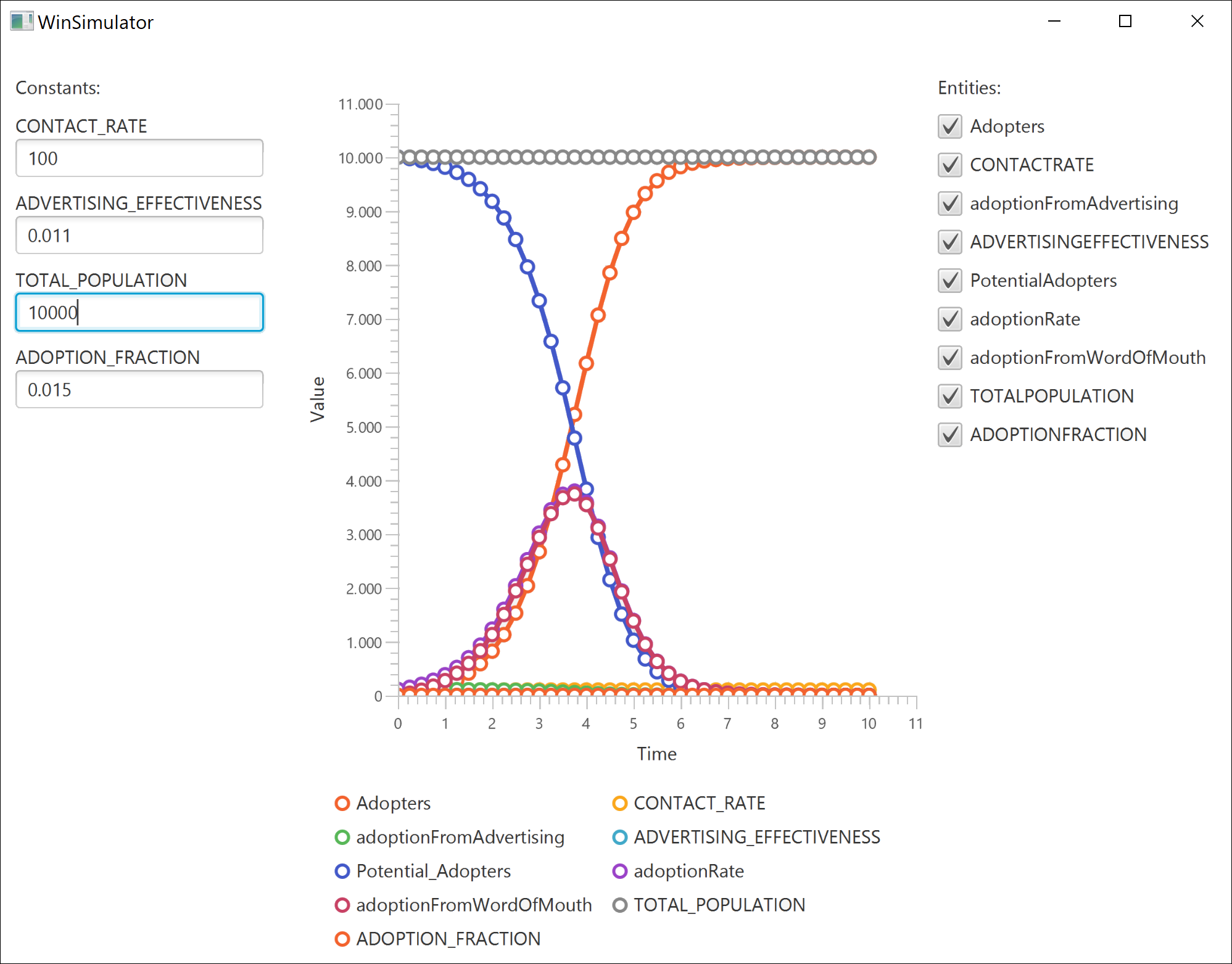
To build only *ksdtoolkit-core* module use:
|
||
```
|
||
gradlew :ksdtoolkit-core:build
|
||
```
|
||
Build will also run all unit tests located in *./ksdtoolkit-core/src/test/kotlin/hr.unipu.ksdtookit/*
|
||
|
||
The last unit test `5_SimulationOutputsTest` contains output tests where e.g. *WinSimulator* is launched.
|
||
|
||
|
||
|
||
|
||
#### Web simulator
|
||
To build *ksdtoolkit-webapp* module and run web server use:
|
||
```
|
||
gradlew :ksdtoolkit-webapp:appStart
|
||
```
|
||
The web simulator will be accessible at: ```http://localhost:8080/```
|
||
|
||

|
||
(Valid developer licence numbers are needed for using *Vaadin Charts* and *Vaadin Spreadsheet*).
|
||
|
||
|
||
#### Mobile simulator
|
||
In IntelliJ first create and launch Android emulator (Tools | Android | AVD Manager).
|
||
To build *ksdtoolkit-mobapp* module and install *apk* file on Android emulator use:
|
||
```
|
||
gradlew :ksdtoolkit-mobapp:appStart
|
||
```
|
||
The mobile simulator will be automatically launched.
|
||
|
||

|
||
|
||
|
||
## Authors
|
||
|
||
- **Siniša Sovilj**<sup>1</sup> <sinisa.sovilj@unipu.hr>
|
||
- **Darko Etinger**<sup>1</sup> <darko.etinger@unipu.hr>
|
||
- **Krešimir Pripužić**<sup>2</sup> <kresimir.pripuzic@fer.hr>
|
||
|
||
<sup>1 = Juraj Dobrila University of Pula, Faculty of Informatics, HR-52100 Pula, CROATIA </sup> \
|
||
<sup>2 = University of Zagreb, Faculty of Electrical Engineering and Computing, HR-10000 Zagreb, CROATIA </sup>
|
||
|
||
|
||
## License
|
||
This project is licensed under the Apache License 2.0 license. See the [LICENSE](LICENSE) file for details.
|
||
|
||
|
||
## Acknowledgments
|
||
Kotlin SD Toolkit was inspired by the great work of:
|
||
* Drost & Stein - [System Dynamics Java-Framework](https://github.com/matthiasstein/SystemDynamics-Framework),
|
||
* Schroeck - [Business Prototyping Toolkit for Python](https://github.com/transentis/bptk_py_tutorial).
|